Noyris Charts
$59 · one-time


For DaVinci Resolve editors
41 chart types.
Animated.
In minutes.
5.0 from working editorsInstant download · 7-day refund · Commercial license
Not Ready? Get Bar chart for free →The motion, on loop
Charts in motion.
Every animated chart type from the pack, playing as they'd land on your timeline. Click any clip to see it large.
Free sample · Bar chart
Free Bar Chart Sample For DaVinci Resolve
Stop rebuilding charts by hand. Grab the Bar chart, drop it into Fusion, and turn a CSV into an animated chart in minutes. Works in Resolve Free.
No payment · Email required · Instant download · Commercial use included
- -Bar Basic fuse
- -1 sample CSV
- -Install guide
- -Resolve 18-21, Free & Studio
This is one chart type, not the full pack. The other 40 chart types and all 204themes stay in the paid pack.

Noyris Bar chart sample
Bar Basic — CSV in, animated out
Install in one drag
Full guide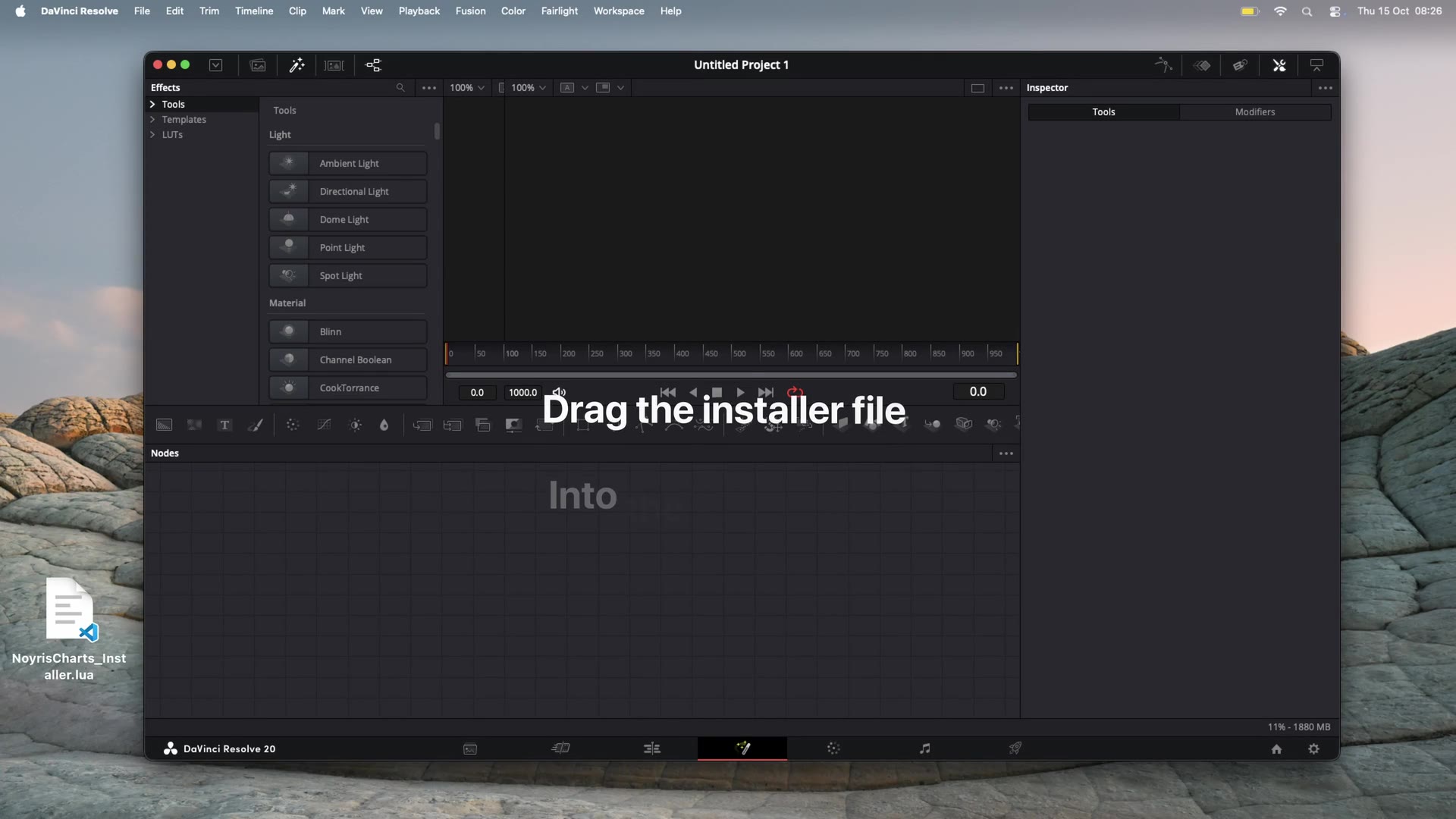
1
Drop the fuse onto Fusion
Drag the .fuse file onto the Fusion page.
2
Restart Resolve
Quit completely, then reopen so the generator appears.
3
Use it on any clip
Find it under Effects → Generators → Noyris Charts.
Try the Bar chart free. If it saves you time, the full pack is one payment of $59.
Download Bar Chart Sample - Free204 built-in color themes
One pack, endless looks.
Every chart type re-skins to any palette - light, dark, or somewhere in between. Pure Resolve - no keyframing, no node graph. Toggle a swatch below to try one now.
Bar Basic
barPie Basic
pieStack Area
stackareaBubble Cluster
bubbleThe palette - every color “Acid Breeze” renders with
From blank timeline to finished chart, in minutes.
1
Drag it onto your timeline
Every chart is a generator in your Effects Library - drag, drop, done.
2
Paste your data or load a CSV
Type values directly or point it at a spreadsheet - it maps automatically.
3
Pick a theme in the Inspector
204 built-in themes, or override any color by hand. No node graph.
4
Export, animated
The grow-in, stagger, and easing are already built. Just render.
Building this by hand in Fusion
~1 hour
With Noyris Charts
Under 2 minutes
Editors are using it on real jobs.
“Client call was in three hours. Had the bar race built in twenty minutes. Normally that's half a day.”
“We use it on every client report now. Everything matches and I'm not rebuilding animations every time.”
From editors using it on client work.
One-time payment
$59
Every chart. Every theme. Every future update.
- -41 chart types across 12 families
- -204 built-in color themes
- -CSV import & live data mapping
- -True 4K - vector-rendered at your timeline resolution, crisp at any size
- -Pixel-perfect edges - bars, lines, and labels are drawn, not bitmap-upscaled
- -Export at any bitrate - H.264, H.265, ProRes, everything is on your Deliver page
- -Full grow/slide/stagger animation engine
- -7-day refund
- -Commercial license, no attribution
7-day money-back guarantee · Instant download
Installation
Set up in one drag.
No plugin, no installer to babysit. Drop one file onto the Fusion page and restart Resolve - all 41 charts and their thumbnails land in place.
1
Drag onto the Fusion page
Open any project, switch to the Fusion page, and drag NoyrisCharts_Installer.lua straight onto it. One drop installs all 41 charts plus their thumbnails.
2
Fully quit Resolve, reopen
Resolve scans generators only at startup, so quit completely (Cmd+Q / Ctrl+Q) and reopen to make the charts appear.
3
Use them anywhere
Find all 41 under Effects → Generators → Noyris Charts on the Edit and Cut pages. Drag any chart onto a clip and edit it in the Inspector.
Prefer the Scripts menu? Copy NoyrisCharts_Installer.lua into your Fusion Scripts/Comp folder and run it from Workspace → Scripts → Comp. A no-script manual zip is included too. Full walkthrough in the documentation.
Questions
Yes. Every chart is drawn as vector geometry at your timeline's frame resolution - set the timeline to UHD 4K (3840×2160), DCI 4K, or higher and the chart renders natively: crisp bars, lines, and labels with no upscaling or pixelation. Export quality is then entirely up to your Deliver-page settings - pick any bitrate or codec you like, from H.264 to ProRes. Nothing in the charts limits or recompresses the output.
Yes. Every chart is a native Fusion generator, so it runs in both the free and Studio versions of DaVinci Resolve - no Studio-only features required.
DaVinci Resolve 18 through 21, on both Mac and Windows.
No. It's a single $59 payment. You keep the files and every future update, for as long as you use them.
Yes - the commercial license covers client projects, monetized YouTube videos, and paid social content. No attribution required.
No. Everything is exposed as sliders and dropdowns in the Edit page Inspector - you never need to open the node graph.
If a chart doesn't do what it says on the page, contact us within 7 days for a full refund.
Next edit that needs a chart? Skip the rebuild.
41 chart types, 204 themes, every future update. One payment of $59 - yours forever.
Get Noyris Charts - $59Instant download · 7-day money-back guarantee · Commercial license